

Phase 06
Elaborate on a Thumbnail
After deciding which page to elaborate on, I started re-sketching, editing, and finalizing the page. I wanted to make it look like an actual comic page I'd be making public, that way my viewers could see my step-by-step process of making a page and all the components therein.

Importing Thumbnail
I transferred to a new file to the thumbnail of Page 03 in order to create a proper comic page file.

Adding Referenece
Here is when I added any reference I would be needing in order to create the page. Since I could not find an accurate pose reference for Chole's full-body pose. I used the 3D models in Clip Studio Paint, as I was able to move, edit, and scale the model however I wanted.

Re-sketching
After getting the proper reference for accurate anatomy, I began re-sketching the page to add more details.

Line Art
Once I was done re-sketching I began working on the line art for the page. I used two different pens here to showcase organic vs inorganic materials. I used a softer pen for Chloe, whereas the architecture had a bit of a thicker texture.

Creating Panels
Here is when I inserted the panels for the page. Since I drew the visuals already, that meant some parts would get cut off. However, this already taken into account when creating the composition. Drawing out the visuals first helped me with perspective. Then narrowing it down assisted with incorporating detail.

Imcorporating Text Bubbles
At this stage I simply inserted where text bubbles would be located. For this particular page only was one needed.

Base Color
I used the fill and pen tool to add a base color to all the visuals. That way when I use the proper colors only the purple sections can be selected. This makes coloring much easier, since I can now stay within my line art.

Color Flats
This is where I began to color the page how I wanted it to be. I used a Clip Studio Paint material to create a sky-like background, and change the page to black in order to give a night like atmosphere.

Shading & Lighting
I started to shade and light areas to give the visuals a more three dimensional feel. I knew the only light would be from either the moon or the street lights so I did my best to mimic that. However, there had to be balance as the page could be seen as too dark so I added a background in the fourth panel.

Detail to Scenery
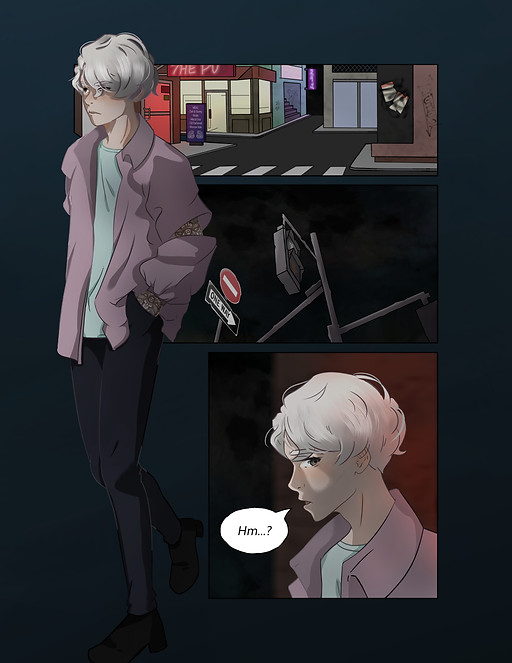
I wanted to add more detail to the city and the final panel so this is when I began to implement more detail. I added words to signs, graffiti, and texture to the building to make them appear run down and cluttered. In panel four I wanted to showcase that Chole was standing near the building titled "The Pub". So I added lighting emanating from the LED in the front of the establishment.

Page Color
Here I simply changed the page colors since I felt that the black was too dark and flat. I decided to change it to a slightly blue-ish black gradient due to the night atmosphere.
Final Edits
Here I fixed any small edits that were needed, such as adding Chole's sleeve tattoos to their arm.